Blender Add-on

Story Bob

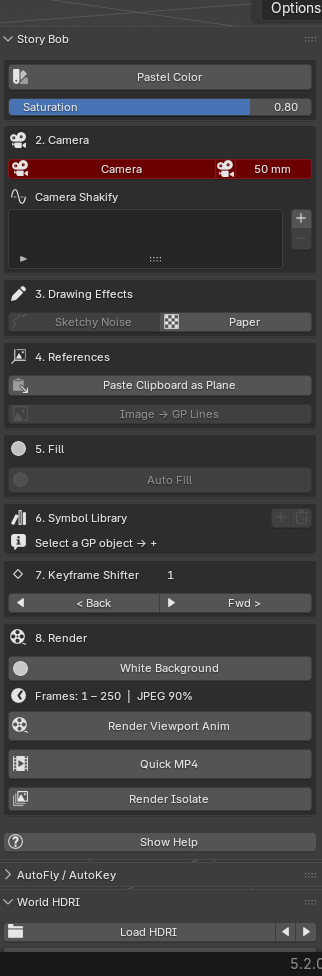
A complete storyboarding toolkit for Blender + Grease Pencil — built from real moments of friction in my own pipeline. One-click fill, instant camera framing, reference paste, hand-drawn effects, and phone-gyro control.

v1.0.0 · Blender 4.4+ · Windows · Free

Fill

Auto Fill & Auto Fill Mesh

Detects the silhouette of your line art and fills it in one click — either as a flat Grease Pencil fill on a layer below your drawing, or as a real polygon mesh you can light and texture. No more tracing fill shapes by hand.

Auto Fill turning open line art into a clean filled silhouette.

Camera

F1 Passepartout & Camera List

Press F1 to snap the black camera mask on or off — full focus on framing, or full scene for blocking, with zero menu-digging. A compact camera list lets you select, view-through, and tweak focal length for every camera in the scene, all from one row.

F1 toggling the passepartout mask while framing a shot.

Color

Pastel Color — Instant Readability

One click assigns a unique soft pastel shade to every object in the scene. Grey-on-grey soup becomes a legible composition: character, prop, and background each read as their own element. Built for fast staging checks and color comps.

Before / after — grey scene vs pastel-separated staging.

References

Paste Clipboard & Image → GP

Snip any reference (Win+Shift+S) and paste it straight into Blender as an image plane with Ctrl+Shift+V. Or trace any reference image directly into editable Grease Pencil strokes — drop, click, iterate.

Pasting a clipboard snip directly into the viewport as a plane.

Effects

Sketchy Noise, Paper & Symbols

Keep clean lines feeling hand-drawn with Sketchy Noise. Give renders a painterly paper-sheet look in one click. Turn any drawing into a reusable Symbol you can place across the scene and edit everywhere at once — like Flash, inside Blender.

Sketchy Noise and the paper-aesthetic render look.

Phone Control

Gyro Phone Controller

Move, rotate, and draw in Blender using your phone as a motion controller over Wi-Fi. One Start button launches everything; scan the link on your phone and tilt to control. Great for loose, gestural blocking.

Controlling an object in the viewport by tilting the phone.

Install

Two ways to install

Drag to install

  1. Make sure Blender 4.2 or newer is open.
  2. Drag the “Drag to Blender to Install” button (above) onto your Blender window.
  3. Blender asks to confirm — click OK. Done.

Manual install

  1. Click Download .zip above.
  2. In Blender: Edit → Preferences → Add-ons → Install from Disk.
  3. Select the downloaded story-bob.zip and enable it.
  4. Find the Story Bob tab in the 3D viewport sidebar (press N).

Want to learn storyboarding in Blender?

I'm putting together tutorials, breakdowns, and — soon — 1-on-1 mentorship and small-group workshops for artists who want to go deeper into storyboarding with Blender + Grease Pencil.